How I Create New Blog Posts
📆 2026-05-12 10:03
Running a gemini capsule is fun, but manually creating a new post folder, writing the boilerplate and remembering to add the "Back to my blog" link is something I dislike. So I wrote a small bash script to automate the process.
Before this script, creating a new post meant:
- making a new directory inside my blog folder
- converting the title into a URL-friendly folder name
- creating an index.gmi file
- adding the title
- adding the timestamp (and always had to search for the calendar emoji)
- adding navigation back to the blog index
Not difficult, just annoying! I know I could have just created YYYY-MM-DD-post-title.gmi but I like the structure "/blog/how-i-create-new-blog-posts/". Makes me feel like I have .htaccess :-D
The script: ./newpost
Now I run:
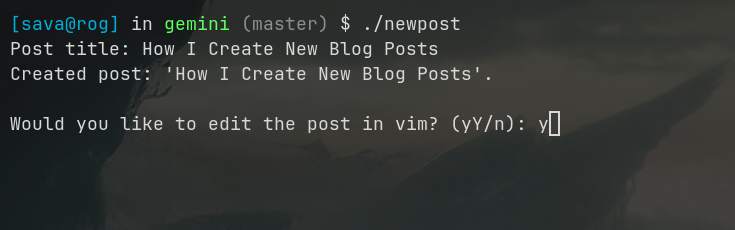
./newpost "How I Create New Blog Posts"
Or simply:
./newpost.sh
And the script asks me for a title interactively.
Screenshot: How I create a new blog post
It automatically:
- generates a lowercase slug from the title
- replaces spaces with hyphens
- removes unsupported characters - only a-z, A-Z and 0-9 allowed
- prevents duplicate hyphens
- creates the post directory
- creates a ready to edit index.gmi file
The generated structure looks like this:
Default template for posts
Each new post starts with:
This gives me a consistent layout for every post. Also, the timestamp is generated automatically with a +1 hour offset, which is enough to write the post and make sure everything looks good. In case I don't finish the post in this 1 hour window I can just modify the date and time :-D.
After generating the file, the script asks:
Would you like to edit the post in vim? (yY/n):
If I answer y or Y, it immediately opens the new file in Vim. This saves another step and lets me jump directly into writing.
Gemini is simple. This is why I have no admin panel, no dashboard, no WYSIWYG editor, and no giant CMS like Wordpress. Just files, folders, and text.
This script keeps it simple also and removes repetitive commands.
The script
The script without comments in txt format
Feel free to use this script. Make sure to adapt it to your paths, blog structure and post template.