Managing Dotfiles with GNU Stow
📆 2026-04-08 09:20
If you've ever tried to keep your development environment consistent across multiple machines, you've probably felt the pain: copying config files, forgetting tweaks, overwriting something important, or ending up with subtle differences that break your workflow.
There's a simple, elegant solution hiding in plain sight: GNU Stow.
What is GNU Stow?
GNU Stow is a symlink farm manager. That sounds fancy, but the idea is straightforward:
- you keep your configuration files (dotfiles) in one organized directory.
- stow creates symbolic links from that directory into your home folder.
- your system thinks the files are in ~, but they're actually managed centrally.
This means no more manual copying. No more drift between machines.
Why Use Stow?
- reproducibility: same setup everywhere
- transparency: plain files, no magic formats
- safety: easy to add/remove configs without overwriting
- simplicity: one command to deploy everything
Basic Setup
Start by creating a directory to store your dotfiles:
Inside this directory, organize configs. I like to store my dotfiles exactly as they are in my home folder:
A screenshot of the files in my git dotfiles repository
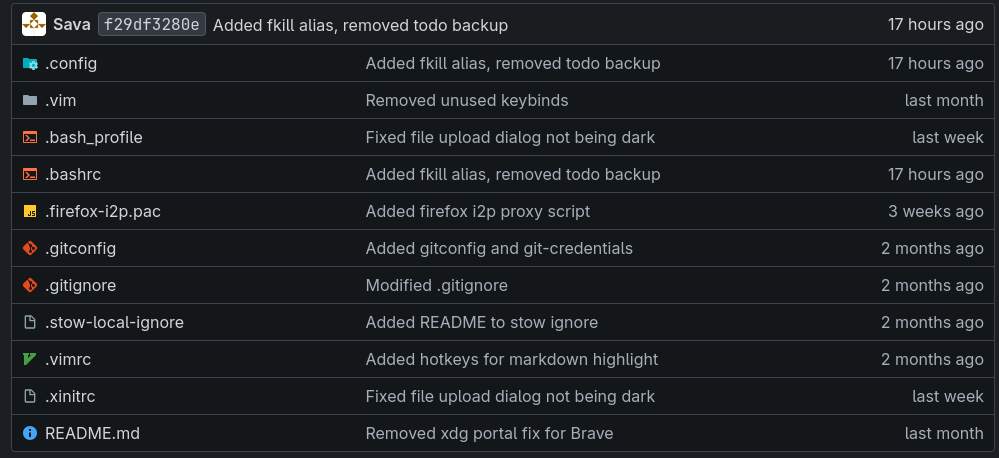
You can create your dotfiles from in any place on your drive. I chose the home folder for simplicity and because, by default, Stow creates symlinks one directory above where you run it (usually your home directory if you're inside ~/dotfiles). That's why everything ends up in ~.
If you want to target a different location, you can use the -t (target) flag:
Moving Existing Configs
If you already have configs in place you can just move them to your new dotfiles directory:
Repeat for other tools. After this, your system uses the managed versions.
Replicating on Another Machine
This is where Stow shines. All you have to do is to clone your dotfiles repository on another machine and run stow. Done! Your environment is now identical.
Unstowing (Clean Removal)
Want to remove a file/app?
This removes the symlink without touching your source file.
Want to stow or unstow all your dot files ? Easy as:
Tips for a Smooth Workflow
- use Git to version your dotfiles directory
- keep secrets (like tokens) out of the repo
- test changes before stowing everything
- use .stow-local-ignore to exclude files if needed
GNU Stow hits a sweet spot between simplicity and power. It doesn't try to reinvent configuration management - it just makes your existing files easier to manage.
Once you adopt it, setting up a new machine goes from a chore to a single command:
And that's the kind of automation that actually sticks.
Oh, and remember to install stow first!