Lagrange for Handheld Linux Consoles
I've published an "early access" (i.e., alpha build) of the handheld Linux variant of Lagrange:
gemini://skyjake.fi/lagrange/handheld-linux.gmi
Please check the page for more information. The biggest missing feature at this point is configurability of the on-screen keyboard.
The general gamepad support will be included in version 1.20 for all platforms.
Jan 12 · 4 months ago · 👍 gritty, wasolili, dce, teekay, The_Jackal, Ian_Grey · 😄 1 🤘 1
4 Comments ↓
I'm typing this from lagrange on my Anbernic RG 353VS running dArkOS 😊. Runs very well!
— Fediverse link showing Lagrange running on my handheld.
I did have to write a new startup script, the hardcoded paths don't work for ArkOS/dArkOS. So I wrote a new one, intended to work with Portmaster. It meant I didn't have to set up a new category in EmulationStation, Lagrange just appears alongside my other installed ports. And that script should work on any system that has Portmaster installed.
I also noticed one minor bug. The "manage identities" menu item when clicking the identity button in the toolbar goes to the wrong settings page. It opens Network Settings instead of identities.
🌆 skyjake [OP/mod...] · Jan 25 at 10:10:
That's great! Did you build it from source or use the prebuilt binary?
The Fediverse link doesn't seem to work though? ("404: Not Found -- GoToSocial only serves Public statuses via the web.")
I'll fix the identities menu issue, I know exactly what's wrong there... Thanks for testing and reporting.
Oh! Sorry, this is using your prebuilt binary. Was worried I'd need to build it myself, but after upgrading my handheld to the latest dArkOS release your binary worked great.
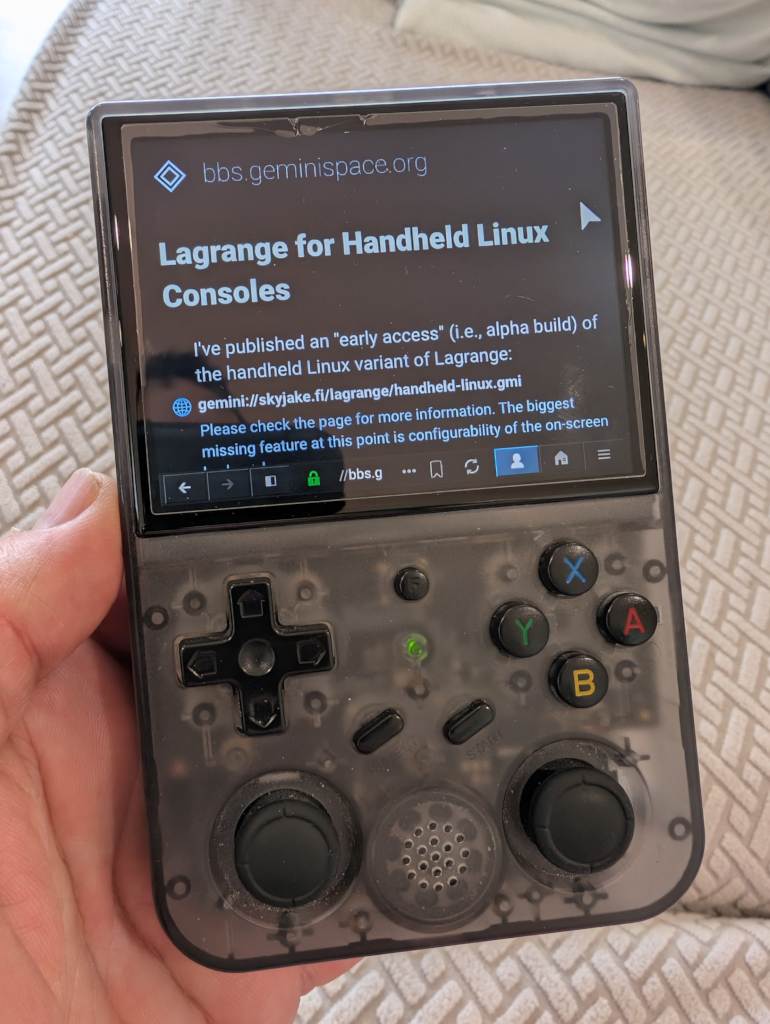
And the fedi post was just a picture of it running. I've attached a new one, downscaling might have messed up how the screen looks, but it's super crisp and clear.
— A small handheld game console, showing this thread on its screen.
🌆 skyjake [OP/mod...] · Jan 26 at 04:43:
Thanks for the photo. I see another problem: the UI layout should be forced to the portrait variant, because there you have the landscape one and it makes the navbar way too crowded. I'll fix that, too.