Hotline Connect
Hotline Connect (Hotline) is BBS-like GUI client/server software, developed in the late 90s and early 2000s for Mac and Windows. It offers public/private chat/messaging, threaded/unthreaded message boards/newsgroups, and file sharing.
Although no longer officially developed, original Mac and Windows client and server software still works on modern systems, as well as clones and modified versions for Mac, Windows, and Linux.
Grab a client and join us! The recommended Windows client is:
Hotline Client 1.9.1, Super Tracker Edition [ZIP]
Connecting to and finding servers is easy!
1) In the main toolbar, choose "Servers" (🌎 globe icon)

2) In the Servers window toolbar, choose "Connect to Server" (two arrows).
Windows client "Servers" window

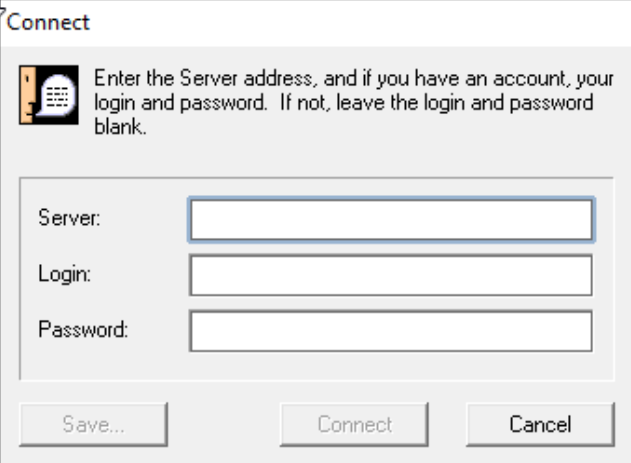
3) Enter the server address and login from below (can leave blank for "guest"). There is no password. Choose "Connect" to connect to the server. You can also choose "Save..." to save the server to your Bookmarks.
Windows client "Connect" window
- SERVER: hotline.hco3.xyz
- USER: guest (default)
- PASSWORD: [none]