How to setup WeeChat for IRC
[WeeChat] is an excellent extensible chat client. It looks like this:
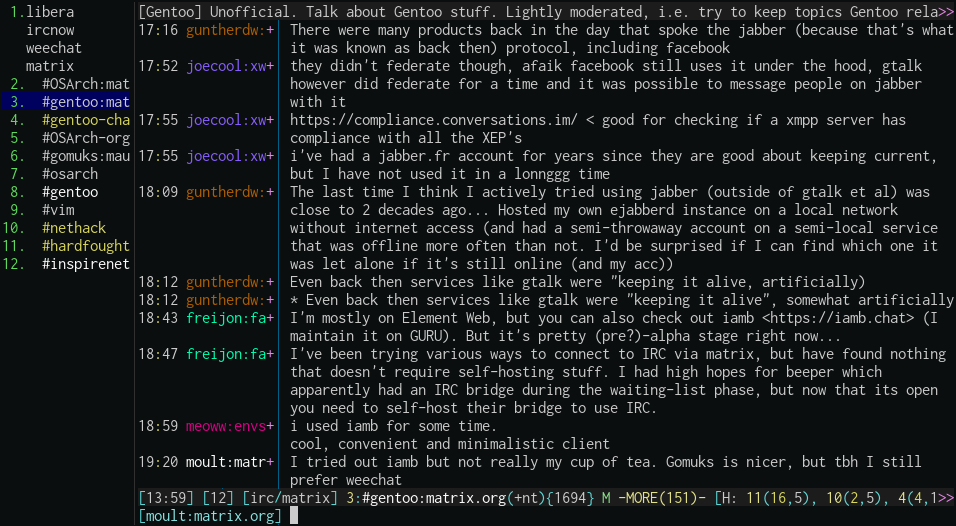
Weechat is highly configurable. It's main purpose is to connect to online [IRC chatrooms]. IRC chatrooms are one of the last bastions of the democratised, wild early internet prior to the proliferation of commercialised walled gardens that most people live in nowadays.
It also connects to other chat protocols like Matrix. If your friends have been tempted by emojis, image attachments, and other luxuries, you can still participate nominally in their chats.
One of the features of IRC is that it is ephemeral. When you join a chatroom, you will not see any messages that were posted prior to you joining. When you leave, you will not receive any messages until you join the chatroom again. So when you disconnect, you're really disconnecting! Nobody can contact you.
If this dosen't appeal to you, there are a number of strategies to retain chat history. The easiest option is to configure WeeChat to store chat logs and replay those chat logs when you reconnect. You'll still miss messages that occur when you're offline, but if you're online almost 24/7, this is not much of a concern.
Even if you set this up, you'll probably have some devices that aren't connected all the time. It'll be nice to have all devices share the same username and see the same messages at the same time. You'll need to figure out how to reliably be online 24/7 from a "server" and to share the same session across any "client".
There are a myriad of solutions to this, including running a [ZNC] or [psyBNC] bouncer, self-hosting [TheLounge] as a modern interface, or using a service like [IRCCloud].
In this article, we'll focus on using a WeeChat relay.
What is a WeeChat relay?
A relay is another client-server solution to keeping you connected 24/7. Instead of your IRC client connected directly to an IRC server, it connects first to a WeeChat relay on some external server. In turn, the WeeChat relay connects to the IRC server.
You'll need a server. You can get a Virtual Private Server (VPS) for about $5 dollars per month. It's worth it!
How to setup a WeeChat relay
The WeeChat relay server is provided by WeeChat itself. After installing WeeChat on your server, run it inside `tmux` and then connect to an IRC server as usual. You can add as many servers as you want, but for now let's just add [Libera.Chat].
Now let's set up a relay. It's pretty clear in the [official WeeChat relay documentation] but let's work through it together.
official WeeChat relay documentation
To begin with, you need to have a certificate for TLS. There are detailed instructions on [Glowing-Bear].
If you just want your own self signed certificate (which nobody but yourself will trust), you can do:
Now back inside WeeChat on your server, setup a password for your relay, and load the certificate you generated.
There are two types of relay protocols WeeChat supports. One is called `irc`, which relays IRC channels. Another is called (confusingly) `weechat`, which relays ... WeeChat itself. Sound confusing? Let's try again.
WeeChat allows external clients to connect via two protocols in its relay plugin:
- `irc`: any IRC client can connect (including WeeChat itself running on another computer). It sends IRC information to these clients.
- `weechat`: only specific clients that support the `weechat` protocol can connect. They can see what WeeChat sees and send messages, but not much else. They can't join or leave channels and so on.
Note that WeeChat itself [cannot connect to a WeeChat relay]. If this sounds like a strange state of affairs, that's because it is. It's a known issue and it's being solved. There is [a new API relay]. The goal with API protocol is to deprecate and replace the `weechat` protocol ([see issue tracker]). You can test out the new API relay functionality in WeeChat 4.2.2 onwards.
cannot connect to a WeeChat relay
But for now, most people aren't on WeeChat 4.2.2 yet, so let's enable both relay protocols on two different ports:
That's it! Your relay is setup!
How to connect to a WeeChat relay
Now back on your client computer, launch WeeChat. Let's get WeeChat connected to the relay by adding a IRC server as usual ... except that the IRC server address is the IP or domain name of your relay and uses the 8000 port. To specify which server this is actually connecting to, you specify the server name in the connection password as a prefix. For example, to connect to the `libera` server we added earlier, we'd prefix the password with `libera:`.
Because you generated your own certificate, you can either set the `tls_fingerprint` manually or disable `tls_verify`.
Then just connect as usual :)
If you have an Android phone, an excellent client is [Weechat-Android] available on F-Droid. It speaks the `weechat` relay protocol, so just connect to `YOUR_RELAY_IP_OR_DOMAIN` on port `9000`.
If you want to connect from a browser on any other device, you can use [Glowing Bear] (if you have a self signed certificate, either self host or use the [insecure] version if you really don't care, it's a public chatroom anyway).