event-driven wireguard connection to home-lab
The past 2 weeks I spent some time configuring [tailscale]: think of it as your own personal, invisible, and very secure "home-lab" on the internet where only your trusted devices can connect and share information.
But, since it uses [wireguard] under the hood, and I had already set it up on my VPS - see [post1] and [post2] - I thought! “Why can't I just do this myself, without relying on a third-party service?”
So, first of all I did a quick test, by sending some text to a “termbin” service (it's like a pastebin but for shells) I run on my VPS. I set it to listen only on the wireguard interface, then activate the wireguard tunnel on my desktop PC at home, opened a shell and sent the following:
It worked like a charm, so I immediately started thinking about the whole home-lab thing. And here I am, connected and happy.
../images/Screenshot_20250601-142531.Avvio-app-Moto.png

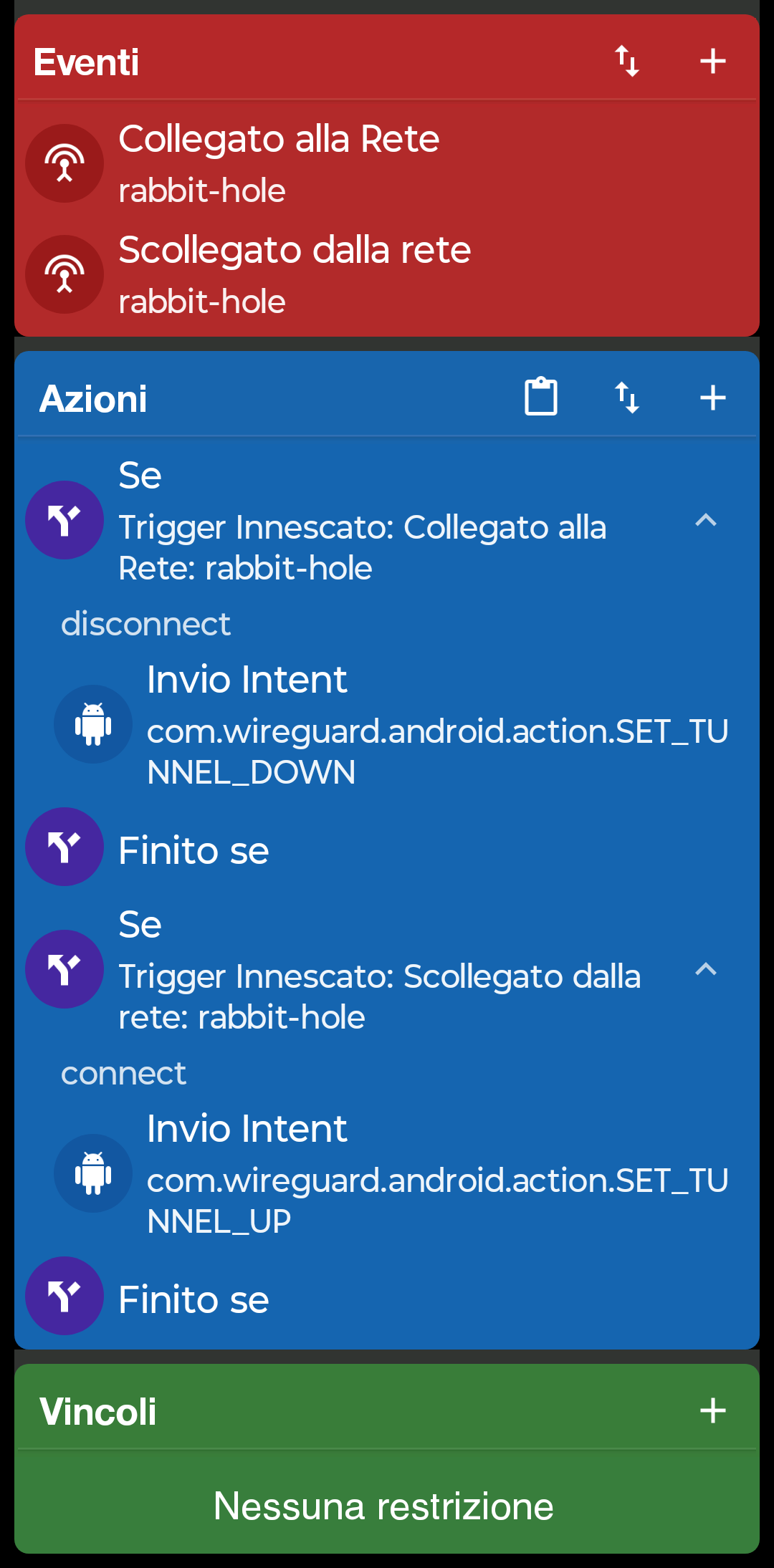
This blog post won't explain how to set wireguard up, for the third time, though.. I just want to show you an automation which makes my life easier. I will only use wireguard to connect to my home-lab from outside my home, using my phone's mobile data. What I'm doing right now is configuring [Macrodroid] to watch for my wifi ssid being connected or disconnected; when it's disconnected I'm probably using the mobile data network, so I want my WG tunnel ON, while if I'm connected to my home wifi, I want the tunnel down.
Since I'm lazy and can't be bothered to remember to turn the VPN on and off manually based on my location, I'm using a macro (attached here). The hardest part is not my own work, instead you can find the original at the [macrodroid forum]: thanks a bunch Dimlos!
../files/Enable_LAB_when_outside.macro
To recap:
- Make sure Macrodroid has permission to activate a WG tunnel
- Make sure WG is allowing third-party apps to activate a tunnel
- Make sure to disable battery optimization for both Macrodroid and WG
- Install Connectivity Helper (Android 14+ and Xiaomi Android 12+) App (you'll be prompted by Macrodroid itself to do that, no need for links here)
Here some screenshots; sorry for Italian language.
../images/Screenshot_20250601-144150.Avvio-app-Moto.png

../images/Screenshot_20250601-144113.Avvio-app-Moto.png

I'm also attaching a screenshot of the macro, other than the macro file itself:
../images/Enable_LAB_when_outside.png
Now I can go shopping like a pro using my self-hosted [kitchenowl] app, "sitting" privately at home.
---