f3s: Kubernetes with FreeBSD - Part 3: Protecting from power cuts
Published at 2025-01-30T09:22:06+02:00
This is the third blog post about my f3s series for my self-hosting demands in my home lab. f3s? The "f" stands for FreeBSD, and the "3s" stands for k3s, the Kubernetes distribution we will use on FreeBSD-based physical machines.
2024-11-17 f3s: Kubernetes with FreeBSD - Part 1: Setting the stage
2024-12-03 f3s: Kubernetes with FreeBSD - Part 2: Hardware and base installation
2025-04-05 f3s: Kubernetes with FreeBSD - Part 4: Rocky Linux Bhyve VMs
2025-05-11 f3s: Kubernetes with FreeBSD - Part 5: WireGuard mesh network
2025-07-14 f3s: Kubernetes with FreeBSD - Part 6: Storage
2025-10-02 f3s: Kubernetes with FreeBSD - Part 7: k3s and first pod deployments
2025-12-07 f3s: Kubernetes with FreeBSD - Part 8: Observability
2025-12-14 f3s: Kubernetes with FreeBSD - Part 8b: Distributed Tracing with Tempo
2026-04-02 f3s: Kubernetes with FreeBSD - Part 9: GitOps with ArgoCD

Table of Contents
- ⇢ f3s: Kubernetes with FreeBSD - Part 3: Protecting from power cuts
- ⇢ ⇢ Introduction
- ⇢ ⇢ Changes since last time
- ⇢ ⇢ ⇢ FreeBSD upgrade from 14.1 to 14.2
- ⇢ ⇢ ⇢ A new home (behind the TV)
- ⇢ ⇢ The UPS hardware
- ⇢ ⇢ Configuring FreeBSD to Work with the UPS
- ⇢ ⇢ ⇢ USB Device Detection
- ⇢ ⇢ ⇢ `apcupsd` Installation
- ⇢ ⇢ ⇢ UPS Connectivity Test
- ⇢ ⇢ APC Info on Partner Nodes:
- ⇢ ⇢ ⇢ Installation on partners
- ⇢ ⇢ Power outage simulation
- ⇢ ⇢ ⇢ Pulling the plug
- ⇢ ⇢ ⇢ Restoring power
- ⇢ ⇢ Conclusion
Introduction
In this blog post, we are setting up the UPS for the cluster. A UPS, or Uninterruptible Power Supply, safeguards my cluster from unexpected power outages and surges. It acts as a backup battery that kicks in when the electricity cuts out—especially useful in my area, where power cuts are frequent—allowing for a graceful system shutdown and preventing data loss and corruption. This is especially important since I will also store some of my data on the f3s nodes.
Changes since last time
FreeBSD upgrade from 14.1 to 14.2
There has been a new release since the last blog post in this series. The upgrade from 14.1 was as easy as:
And after rebooting, I ran:
And after another reboot, I was on 14.2:
And, of course, I ran this on all 3 nodes!
A new home (behind the TV)
I've put all the infrastructure behind my TV, as plenty of space is available. The TV hides most of the setup, which drastically improved the SAF (spouse acceptance factor).
New hardware placement arrangement

I got rid of the mini-switch I mentioned in the previous blog post. I have the TP-Link EAP615-Wall mounted on the wall nearby, which is my OpenWrt-powered Wi-Fi hotspot. It also has 3 Ethernet ports, to which I connected the Beelink nodes. That's the device you see at the very top.
The Ethernet cables go downward through the cable boxes to the Beelink nodes. In addition to the Beelink f3s nodes, I connected the TP-Link to the UPS as well (not discussed further in this blog post, but the positive side effect is that my Wi-Fi will still work during a power loss for some time—and during a power cut, the Beelink nodes will still be able to communicate with each other).
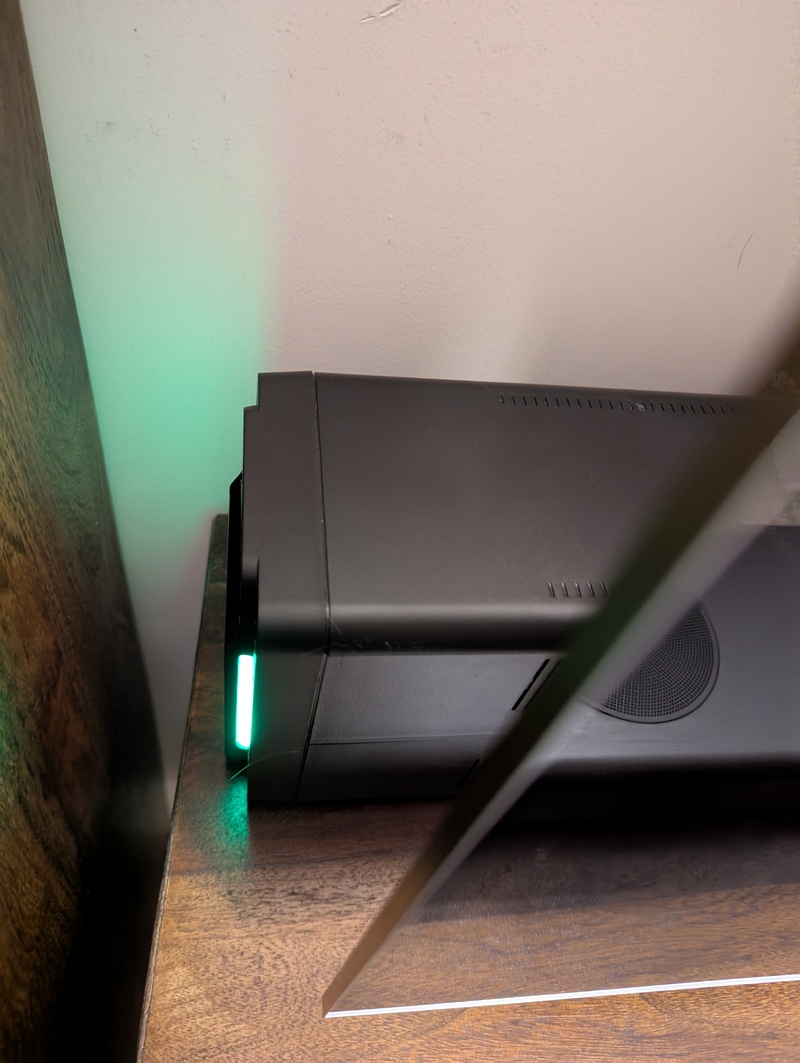
On the very left (the black box) is the UPS, with four power outlets. Three go to the Beelink nodes, and one goes to the TP-Link. A USB output is also connected to the first Beelink node, `f0`.
On the very right (halfway hidden behind the TV) are the 3 Beelink nodes stacked on top of each other. The only downside (or upside?) is that my 14-month-old daughter is now chaos-testing the Beelink nodes, as the red power buttons (now reachable for her) are very attractive for her to press when passing by randomly. :-) Luckily, that will only cause graceful system shutdowns!
The UPS hardware
I wanted a UPS that I could connect to via FreeBSD, and that would provide enough backup power to operate the cluster for a couple of minutes (it turned out to be around an hour, but this time will likely be shortened after future hardware upgrades, like additional drives and a backup enclosure) and to automatically initiate the shutdown of all the f3s nodes.
I decided on the APC Back-UPS BX750MI model because:
- Zero noise level when there is no power cut (some light noise when the battery is in operation during a power cut).
- Cost: It is relatively affordable (not costing thousands).
- USB connectivity: Can be connected via USB to one of the FreeBSD hosts to read the UPS status.
- A power output of 750VA (or 410 watts), suitable for an hour of runtime for my f3s nodes (plus the Wi-Fi router).
- Multiple power outlets: Can connect all 3 f3s nodes directly.
- User-replaceable batteries: I can replace the batteries myself after two years or more (depending on usage).
- Its compact design. Overall, I like how it looks.
The APC Back-UPS BX750MI in operation.
Configuring FreeBSD to Work with the UPS
USB Device Detection
Once plugged in via USB on FreeBSD, I could see the following in the kernel messages:
`apcupsd` Installation
To make use of the USB connection, the `apcupsd` package had to be installed:
I have made the following modifications to the configuration file so that the UPS can be used via the USB interface:
I left the remaining settings as the default ones; for example, the following are of main interest:
I then enabled and started the daemon:
UPS Connectivity Test
And voila, I could now access the UPS information via the `apcaccess` command; how convenient :-) (I also read through the manual page, which provides a good understanding of what else can be done with it!).
APC Info on Partner Nodes:
So far, so good. Host `f0` would shut down itself when short on power. But what about the `f1` and `f2` nodes? They aren't connected directly to the UPS and, therefore, wouldn't know that their power is about to be cut off. For this, `apcupsd` running on the `f1` and `f2` nodes can be configured to retrieve UPS information via the network from the `apcupsd` server running on the `f0` node, which is connected directly to the APC via USB.
Of course, this won't work when `f0` is down. In this case, no operational node would be connected to the UPS via USB; therefore, the current power status would not be known. However, I consider this a rare circumstance. Furthermore, in case of an `f0` system crash, sudden power outages on the two other nodes would occur at different times making real data loss (the main concern here) less likely.
And if `f0` is down and `f1` and `f2` receive new data and crash midway, it's likely that a client (e.g., an Android app or another laptop) still has the data stored on it, making data recoverable and data loss overall nearly impossible. I'd receive an alert if any of the nodes go down (more on monitoring later in this blog series).
Installation on partners
To do this, I installed `apcupsd` via `doas pkg install apcupsd` on `f1` and `f2`, and then I could connect to it this way:
But I want the daemon to be configured and enabled in such a way that it connects to the master UPS node (the one with the UPS connected via USB) so that it can also initiate a system shutdown when the UPS battery reaches low levels. For that, `apcupsd` itself needs to be aware of the UPS status.
On `f1` and `f2`, I changed the configuration to use `f0` (where `apcupsd` is listening) as a remote device. I also changed the `MINUTES` setting from 3 to 6 and the `BATTERYLEVEL` setting from 5 to 10 to ensure that the `f1` and `f2` nodes could still connect to the `f0` node for UPS information before `f0` decides to shut down itself. So `f1` and `f2` must shut down earlier than `f0`:
So I also ran the following commands on `f1` and `f2`:
And then I was able to connect to localhost via the `apcaccess` command:
Power outage simulation
Pulling the plug
I simulated a power outage by removing the power input from the APC. Immediately, the following message appeared on all the nodes:
I ran the following command to confirm the available battery time:
And after around one hour (`f1` and `f2` a bit earlier, `f0` a bit later due to the different `BATTERYLEVEL` and `MINUTES` settings outlined earlier), the following broadcast was sent out:
And all the nodes shut down safely before the UPS ran out of battery!
Restoring power
After restoring power, I checked the logs in `/var/log/daemon.log` and found the following on all 3 nodes:
All good :-)
Conclusion
I have the same UPS (but with a bit more capacity) for my main work setup, which powers my 28" screen, music equipment, etc. It has already been helpful a couple of times during power outages here, so I am sure that the smaller UPS for the F3s setup will be of great use.
Read the next post of this series:
f3s: Kubernetes with FreeBSD - Part 4: Rocky Linux Bhyve VMs
Other BSD related posts are:
2026-04-02 f3s: Kubernetes with FreeBSD - Part 9: GitOps with ArgoCD
2025-12-14 f3s: Kubernetes with FreeBSD - Part 8b: Distributed Tracing with Tempo
2025-12-07 f3s: Kubernetes with FreeBSD - Part 8: Observability
2025-10-02 f3s: Kubernetes with FreeBSD - Part 7: k3s and first pod deployments
2025-07-14 f3s: Kubernetes with FreeBSD - Part 6: Storage
2025-05-11 f3s: Kubernetes with FreeBSD - Part 5: WireGuard mesh network
2025-04-05 f3s: Kubernetes with FreeBSD - Part 4: Rocky Linux Bhyve VMs
2024-12-03 f3s: Kubernetes with FreeBSD - Part 2: Hardware and base installation
2024-11-17 f3s: Kubernetes with FreeBSD - Part 1: Setting the stage
2024-04-01 KISS high-availability with OpenBSD
2024-01-13 One reason why I love OpenBSD
2022-10-30 Installing DTail on OpenBSD
2022-07-30 Let's Encrypt with OpenBSD and Rex
2016-04-09 Jails and ZFS with Puppet on FreeBSD
E-Mail your comments to `paul@nospam.buetow.org` :-)